TaurusForm
The TaurusForm widget is the standard way for Taurus applications to
present a set of attribute and device readings and controls in a form-like
layout.
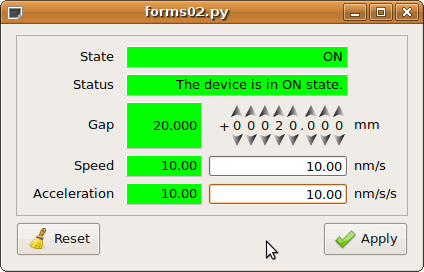
For each item (attribute or device) represented in a TaurusForm, the
following elements are shown, vertically aligned with those of the other items
along five columns:
Label text: shows the name or another identification of the item.
Read widget: shows the current value of the item. If the information cannot be shown compactly, it may be a button that launches a separate dialog with more detailed information. The read widget may provide information on both the read value and the quality status of the attribute, typically using the Taurus color convention. For non-writable items, the read widget extends over the second and third columns.
Write widget: shown only if the item allows writing. It is used to modify the value of the item. If this cannot be done compactly, it may launch a separate dialog.
Units text: shows the units associated with the item. It is not shown if no units are defined.
Extra widget: additional space that may be used by some custom widgets.
The precise widgets used by default for each item are determined by the type of attribute or class of device, together with the item factories available in the Taurus installation.
Widget selection
By default, TaurusForm tries to use the most appropriate Taurus widget
for each model.
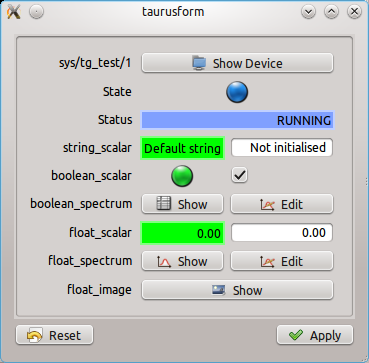
A Taurus form created with taurus form sys/tg_test/1 sys/tg_test/1/state
sys/tg_test/1/status sys/tg_test/1/string_scalar sys/tg_test/1/boolean_scalar
sys/tg_test/1/boolean_spectrum sys/tg_test/1/float_scalar
sys/tg_test/1/float_spectrum sys/tg_test/1/float_image.
TaurusForm uses item factories to obtain the widget with which each model is
represented. These factories can be provided by Taurus itself or by external
plugins. For example, Sardana can provide factories for displaying Pool
devices.
If a model is not handled by any enabled item factory, Taurus falls back to a generic widget that introspects the model. For attributes, this includes such properties as whether the value is scalar or array-like, numeric, string or boolean, and writable or read-only. The generic widget can in some cases be customized further by selecting among the available subwidgets.
See Use Taurus forms for task-oriented instructions on launching and customizing forms.